


Article
SaaS Customer Retention: How Support Operations Reduce Churn
Most SaaS churn post-mortems reach the same conclusion: the product wasn't good enough. The user couldn't figure something out, didn't see enough value, found a cheaper alternative. Product, pricing, positioning are the variables that get scrutinised. Support operations rarely make the list.
That's a diagnostic error. Customers decide at renewal on the whole experience, and the support interaction three weeks before renewal is part of it. In long-running, multi-country support operations, the warning signs often reach the support queue first. The same issue comes back, billing questions arrive as renewal approaches, and onboarding tickets stop moving. None of that shows up in a product dashboard.
SaaS customer retention is, in large part, a support operations problem. A SaaS customer support desk designed to catch and close those signals can reduce churn independently of the release notes.
Why SaaS customer retention is a support operations problem
The standard framing of SaaS customer retention puts product at the centre. Retention goes up when feature adoption goes up. Churn goes down when time-to-value shortens. Net revenue retention improves when expansion revenue exceeds contraction. All of this is true.
What it misses is the role of friction. A user who hits a billing problem three days before renewal and can't get a response within 24 hours doesn't experience that as a product failure. They experience it as a signal about how much the company values their time. That signal matters more at renewal than the last feature shipped.
The practical implication is that retention plans built only around product improvements miss the operational side. Response times, resolution quality, onboarding support and complaint handling run in parallel and affect churn regardless of what's in the release notes.
Attrition vs churn: What each tells a support team
Attrition and churn both measure loss, but they answer different questions for a support team. Customer attrition rate tracks the gradual loss of active users or accounts during a period. Churn rate counts the customers or revenue lost when contracts come up for renewal.
| Measure | How to calculate it | What a support team can move |
| Customer attrition rate | Active users or accounts lost during the period, divided by active users or accounts at the start, as a percentage | Onboarding help, fast fixes for blockers, follow-up after repeat contacts |
| Logo churn rate | Customers who did not renew in the period, divided by customers at the start of the period, as a percentage | Renewal-period handling, escalation ownership, complaint resolution |
| Revenue churn rate | Recurring revenue lost to cancellations and downgrades, divided by recurring revenue at the start, as a percentage | Billing issue resolution, downgrade conversations, tier SLAs for high-value accounts |
The logo view counts accounts, while the revenue view weights them by what they pay. A desk that loses several small accounts but saves one enterprise renewal looks weak on logos and healthy on revenue. Attrition is often the earlier signal: an account that has stopped using the product can still renew on paper for months. That is why support teams should watch active usage alongside contract dates.
The retention metrics SaaS teams must track
Retention and customer satisfaction metrics in SaaS are not interchangeable, and using the wrong one for operational decisions leads to the wrong interventions.
| Metric | What it measures | What drives it operationally |
| Customer Retention Rate (CRR) | Percentage of customers who renew in a period | Onboarding quality, support resolution rate, escalation handling |
| Gross Revenue Retention (GRR) | Revenue retained from existing customers, excluding expansion | Churn and downgrades; shows how well the existing base holds |
| Net Revenue Retention (NRR) | Revenue retained including expansions and upsells, minus churn | Expansion motion, account management, product adoption post-onboarding |
CRR and GRR are where support operations have the most direct influence. Both are primarily about preventing loss rather than driving growth. When support quality drops, CRR and GRR are the metrics that show it first, often weeks before it appears in churn reporting.
NRR above 100% means a SaaS business is growing from its existing base even if it acquires no new customers. Getting there requires low gross churn as the foundation. Support is part of how that foundation holds.
Churn signals a support desk sees before renewal
A support desk sees churn signals before the account team does, because unhappy customers write in before they cancel. The signals are only useful if each one has an owner who acts on it.
- Repeat contacts on one issue. The same customer raises the same problem a second or third time. The team lead reviews the thread and flags the account to the client's customer success manager.
- Billing contacts near renewal. Invoice disputes, seat reductions or payment failures in the renewal window. The account manager calls back, not only the agent who took the ticket.
- Stalled onboarding tickets. Setup or integration tickets open past the agreed time-to-first-value. The onboarding owner chases them to closure.
- Escalations that change hands. A case transferred more than once without resolution. The escalation owner takes it and keeps it until it is closed.
- Negative sentiment on renewal-period contacts. Frustrated tone on contacts from accounts close to renewal. QA tags the contact and passes it to the customer success team the same week.
At Simply Contact, QA is run end to end by our own team, so tagging these signals can sit with the same people who score contacts. Agree before launch where each tag is recorded and how it reaches the client's customer success team. A signal that nobody owns is just a ticket theme in a monthly report.
Support-driven SaaS retention strategies that work
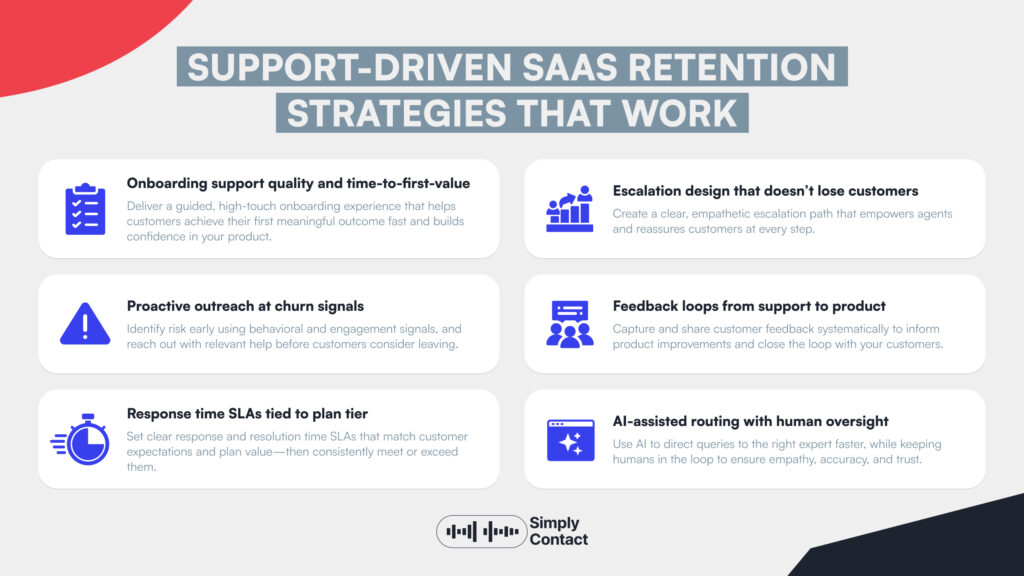
The following six operational levers link support work most directly to SaaS customer retention. Each one starts with an operational input the support team controls.
Onboarding support quality and time-to-first-value
The period between a customer signing and their first meaningful outcome is the highest-churn window in a SaaS relationship. Support's role here is to remove the friction that slows that first-value moment.
This means agents who understand the product well enough to answer configuration questions, troubleshoot integrations and guide users through setup at first line. Product training has to cover the client's real setup screens and the integrations customers connect most often, not only the feature list. Setup questions that bounce from first line to engineering are where time-to-first-value slips. Good technical support outsourcing puts that knowledge at first line instead of routing it.
Proactive outreach at churn signals
The best SaaS retention strategies intercept churn before the customer decides to leave. This requires identifying signals: usage drop-offs, unanswered support tickets, billing failures, feature adoption stalls. The goal is to trigger outreach before they compound.
Support teams that have visibility into product usage data and integration with CRM systems can make this proactive. A customer who hasn't logged in for three weeks and had an unresolved support ticket two weeks ago is at risk. A team that spots that pattern and reaches out with a helpful check-in, converts some of that risk into retained revenue.
This is one of the harder operational capabilities to build. Ditto Music, a music distribution platform, serves artists rather than SaaS users, but the principle is the same. Its Head of Support, Stacey Warder, said our team tends to “catch undesirable trends before they become real issues”. On the Ditto Music account, artist-facing CSAT rose from 51% to 88%.
Response time SLAs tied to plan tier
Tiered SLAs are the structural solution. Here is one example structure, not a benchmark. Enterprise and high-value accounts get sub-hour responses and named contacts. Mid-market accounts get same-day responses, and smaller accounts get community and async channels. The tiers should be explicit in the contract, measurable in the support platform and enforced by routing logic rather than agent discretion.
This is one of the B2B SaaS customer retention strategies that requires operational discipline to maintain. Routing rules break. Priorities drift. Without regular QA review, tier SLAs erode in practice even when they're correct on paper.
Escalation design that doesn't lose customers
Escalations are where churn happens. A customer who hits a complex issue, gets transferred twice, then has to repeat their context to a third agent has just experienced the support equivalent of losing their work. The negative sentiment from that experience is disproportionate to the actual time lost.
Well-designed escalation paths move context with the customer. The escalation agent reads the full thread. The customer doesn't repeat themselves. The higher-tier contact resolves the issue in one interaction rather than continuing the chain. Context travels forward; the customer doesn't carry it. Taking ownership in customer service is the agent-level skill that makes escalation design work in practice: the disposition to stay with a problem rather than pass it.
Feedback loops from support to product
Support agents handle the complaints, confusion, and failure modes that product teams often don't see in analytics. An agent fielding ten questions a day about the same configuration step has information about friction in the product that the roadmap team doesn't have.
The mechanism for turning that into action is a structured feedback loop: weekly tagging of recurring contact types, a regular sync between support operations and product management, and a documented process for support-originated feature requests to reach the prioritisation process. Without the structure, the insight stays in the ticket queue and never improves the product.
Our AI knowledge assistant case shows what happens when this loop is closed at the agent level. A proper knowledge system gave agents faster access to accurate answers. Within the first four weeks, the case page reports an 8% increase in CSAT and 16% better cost efficiency per conversation. It also reports 50% fewer questions escalated to supervisors.
AI-assisted routing with human oversight
AI-assisted routing uses intent detection to send contacts to the right agent or tier without making customers navigate a manual menu. When it works, first contact resolution goes up and average handle time falls. When it fails (misclassified intent, wrong routing rules, dead-end automation), it adds a layer of frustration before the customer reaches a person.
The "with human oversight" part matters. Fully automated flows that have no easy path to a real agent are a churn risk for complex issues. The right model uses automation to handle high-volume simple contacts efficiently, while making the path to a human agent clear and fast for anything more complex. This keeps customer support automation serving retention rather than working against it.
Why outsourcing SaaS support can strengthen retention
The assumption that in-house support teams retain customers better than outsourced ones is not well supported by the evidence. The actual variable is team quality: training depth, QA consistency, response time performance. Whether the team sits inside or outside the company is secondary.
An in-house support team at a scaling SaaS company is typically doing five things at once: handling contacts, onboarding users, writing help documentation, fielding product feedback, and covering overnight shifts with whoever is available. Stretched teams make more errors, respond more slowly, and retain institutional knowledge less reliably as they grow.
SaaS customer support outsourcing to a partner with proper product training, structured QA, and 24/7 coverage removes the stretch. The outsourced team does one job, support, and does it consistently. The in-house team retains ownership of product feedback synthesis, escalation review, and the strategic decisions about how to invest in support over time.
A SaaS buyer can check four things before signing. Ask for the product training plan and how it covers integrations. Ask how QA calibration works and who sits in it. Ask who owns an escalation until it closes. Ask how churn signals reach the customer success team. At Simply Contact, recruitment, training design, IT support and QA are run end to end by our team, so each answer has one owner. The wider trade-offs are covered in our comparison of in-house vs outsourced support.
The concern that outsourced teams can't represent a SaaS brand authentically is worth taking seriously. The answer is investment in product training and cultural onboarding. An outsourced agent who knows the product as well as an in-house one, and is held to the same QA standards, is indistinguishable to the customer and provides numerous benefits of outsourcing.
How Simply Contact supports SaaS retention operations
Simply Contact works with SaaS and digital platform companies across Europe and the UK, building support operations calibrated to retention outcomes rather than volume metrics alone.
The operational approach is built around product-trained agents. Before going live, new agents practice realistic, project-specific scenarios in AI call simulation, which the case page reports shortens onboarding; every training scenario can be replayed for review.
For a scaling SaaS company managing churn pressure, that ramp speed matters: the team is ready to retain customers before the growth curve makes support quality a bottleneck.
For teams weighing outsourcing as part of a churn plan, the useful question is not whether an outsourced team can learn the product. It is whether the company will fund the product training and QA that make it possible.
Retention is a system and support is where customers experience it every day
SaaS customer retention comes down to a simple question customers answer at renewal: did this company make my work easier, and did they handle it when something went wrong? The product answers the first question. Support answers the second, every day, in every ticket, every chat, every onboarding call.
The difference between companies with similar products often sits in how rarely their customers feel the friction that starts a churn conversation.
Build the support operation accordingly. Set SLAs and enforce them. Create feedback loops. Train agents on the product. Use automation where it helps and not where it doesn't. And if the in-house team is too stretched to do all of that consistently, outsourcing customer support to a partner who can is a retention investment.
Talk to our team about how Simply Contact builds support operations that reduce SaaS churn.

Newsletter
Subscribe
Subscribe to our newsletter to receive valuable industry insights and the latest research reports.